Shrink Docker images from 1.2GB to 30MB — multi-stage + distroless
Patterns that cut Docker image size 90-99% for Node, Python, Go. Multi-stage, distroless, alpine — with real before/after numbers and tradeoffs.
A typical Dockerfile written by copy-paste from a tutorial produces images 500 MB to 1.2 GB. The same application built properly ships at 3-120 MB with better security. The difference is two patterns: multi-stage builds and picking the right final-stage base image. Here’s the full breakdown with real numbers and Dockerfiles for Node, Python, and Go.
Why image size still matters in 2026
- Pull time on cold nodes — Kubernetes scheduling to a node without the image cached pulls the full compressed size. A 1.2 GB image adds 30-90 seconds to cold starts. A 30 MB image adds 2-5.
- Registry cost — Every push, pull, and stored version bills at cloud egress + storage rates. A 40x size difference compounds fast at fleet scale.
- Attack surface — Every package installed in the image is a package a scanner can find a CVE in. Debian Slim ships ~90 packages; Alpine ships ~14; distroless ships close to none.
- Serverless cold start — Lambda container images bill on init time; smaller = faster + cheaper per invocation.
Small images are not just aesthetic. Each MB is a real cost line.
The 4 tiers of base image — sizes and tradeoffs
On-disk sizes for empty images (no app added). Docker Hub displays compressed sizes on the tag page; the numbers below are approximate uncompressed sizes as they appear in docker image ls:
| Base image | Uncompressed size | Package manager? | Shell? | CVEs (typical) |
|---|---|---|---|---|
scratch | 0 bytes | None | None | 0 |
gcr.io/distroless/static-debian13 | ~2 MB | None | None (busybox in :debug) | Very low |
alpine:latest | ~7 MB | apk | ash | 0-5 |
gcr.io/distroless/base-debian13 | ~20 MB | None | None (busybox in :debug) | Very low |
debian:12-slim | ~80 MB | apt | bash | 100-200 |
debian:12 (full) | ~120 MB | apt | bash | 200+ |
Compressed pull sizes are roughly 30-40% of the uncompressed numbers above — that’s what actually crosses the network on docker pull.
Trade-off rule of thumb:
scratch— smallest possible. Works only for statically compiled binaries (Go, Rust, some C/C++). Fails immediately for anything needing glibc, DNS resolution, or CA certificates.distroless/static— scratch + glibc + CA bundle + tzdata +/etc/passwd. The default for compiled binaries needing outbound TLS.alpine— small full distro. Package manager available for installing runtime deps. Uses musl libc — most Node/Python packages work, but some C-extension wheels don’t have musl builds and fall back to slow source compile.distroless/base— glibc + basic runtime. Preferred over Alpine for glibc-linked binaries and when compatibility matters more than absolute size.debian:slim— full glibc userland with a reduced package set. Use only when you actually needaptat runtime — rare in production.
Multi-stage builds — the pattern
A multi-stage Dockerfile uses one image (with all build tools) to produce artifacts, then copies only those artifacts into a minimal final image. The build tools never ship.
Skeleton:
# Stage 1: build (has compilers, dev headers, everything heavy)
FROM node:24 AS build
WORKDIR /app
COPY package*.json ./
RUN npm ci
COPY . .
RUN npm run build

# Stage 2: runtime (minimal — only what the app needs to run)
FROM gcr.io/distroless/nodejs24-debian13
WORKDIR /app
COPY --from=build /app/dist ./dist
COPY --from=build /app/node_modules ./node_modules
CMD ["dist/server.js"]
Two stages. Final image contains no npm, no build tools, no source code — just the compiled dist/ and its production node_modules.
Real before/after numbers per language
Node.js
Naive Dockerfile (typical tutorial output):
FROM node:24
WORKDIR /app
COPY . .
RUN npm install
CMD ["node", "server.js"]
Image size: ~1.1 GB (full node:24 base + dev + prod dependencies + source).
Multi-stage with distroless:
FROM node:24 AS build
WORKDIR /app
COPY package*.json ./
RUN npm ci --omit=dev
COPY . .
RUN npm run build

FROM gcr.io/distroless/nodejs24-debian13
WORKDIR /app
COPY --from=build /app/dist ./dist
COPY --from=build /app/node_modules ./node_modules
CMD ["dist/server.js"]
Image size: ~150-200 MB (distroless nodejs + prod-only node_modules + built dist).
Reduction: ~85%.
For further reduction, install a lighter runtime like distroless/nodejs20-debian12 directly and avoid bundling large node_modules if the app can be bundled with esbuild or webpack into a single file — then only ship the bundle:
FROM node:24 AS build
WORKDIR /app
COPY package*.json ./
RUN npm ci
COPY . .
RUN npm run bundle   # esbuild produces dist/server.js as a single bundled file

FROM gcr.io/distroless/nodejs24-debian13
COPY --from=build /app/dist/server.js /server.js
CMD ["/server.js"]
With bundling: ~50-80 MB total.
Python
Naive:
FROM python:3.12
WORKDIR /app
COPY . .
RUN pip install -r requirements.txt
CMD ["python", "app.py"]
Image size: ~1.2 GB (full python:3.12 + build headers for wheels + all requirements).
Multi-stage with distroless:
FROM python:3.12 AS build
WORKDIR /app
COPY requirements.txt .
RUN pip install --user --no-cache-dir -r requirements.txt
COPY . .

FROM gcr.io/distroless/python3-debian13
WORKDIR /app
COPY --from=build /root/.local /root/.local
COPY --from=build /app .
ENV PYTHONPATH=/root/.local/lib/python3.12/site-packages
CMD ["app.py"]
Image size: ~100-150 MB (distroless python3 ~50 MB + user-site packages + app).
Reduction: ~88%.
Python gotcha: some packages ship C extensions that require compilation. Do the compile in the build stage where headers exist, then copy the installed .local directory to the distroless stage where headers do NOT exist. Copying source-only wheels or trying to pip install in distroless fails — no compiler.
Go
Naive:
FROM golang:1.22
WORKDIR /app
COPY . .
RUN go build -o server
CMD ["./server"]
Image size: ~800 MB - 1 GB (golang toolchain + source + binary).
Multi-stage with scratch:
FROM golang:1.22 AS build
WORKDIR /src
COPY go.mod go.sum ./
RUN go mod download
COPY . .
RUN CGO_ENABLED=0 go build -ldflags="-s -w" -o /out/server ./cmd/server

FROM scratch
COPY --from=build /out/server /server
COPY --from=build /etc/ssl/certs/ca-certificates.crt /etc/ssl/certs/
ENTRYPOINT ["/server"]
Image size: ~5-20 MB (statically compiled Go binary + CA bundle).
Reduction: ~98%.
Go notes:
CGO_ENABLED=0forces a static build — no libc dependency-ldflags="-s -w"strips debug symbols (further ~30% shrink)- Copy
/etc/ssl/certs/ca-certificates.crtfrom the build stage so the binary can make outbound HTTPS calls (scratchhas no CA bundle) - Alternative: use
gcr.io/distroless/static-debian13(adds ~2 MB but includes CA bundle, tzdata,/etc/passwdfor non-root)
Rust
Similar pattern to Go. Full toolchain builds a ~1 GB image; static compile with x86_64-unknown-linux-musl target lands in the 5-15 MB range on scratch or distroless/static. Reduction typically ~99%.
The security angle — always scan
Small images with fewer packages = fewer CVEs to patch. Verify with a scanner:
Trivy (all-in-one — vulnerabilities + secrets + misconfig):
trivy image myapp:latest
Grype (pure CVE with EPSS + KEV scoring):
grype myapp:latest
Both use independent databases, so running both catches slightly different CVE sets. Common production pattern: Trivy in CI on every image build, Grype as a second-opinion pass on release candidates.
Wire into CI:
# GitHub Actions example
- name: Scan image
  uses: aquasecurity/trivy-action@v0.36.0
  with:
    image-ref: myapp:${{ github.sha }}
    severity: HIGH,CRITICAL
    exit-code: 1
Fails the build on any HIGH or CRITICAL CVE.
Important: always pin trivy-action to a specific version tag, not @master or a floating tag. The action’s version tags v0.0.1 through v0.34.2 were compromised in a March 2026 supply chain attack that pushed malicious code capable of exfiltrating CI/CD secrets. Use v0.35.0 or later (v0.36.0 at the time of writing). This pattern applies to any third-party GitHub Action — pin the exact SHA or a known-good version tag.
Distroless deep dive — when yes, when no
Use distroless when:
- Production runtime (no need to debug in the container)
- Security requires minimal attack surface
- Compliance flags every unnecessary binary
- The app has no runtime tooling requirements
Skip distroless when:
- Development or local runs (no shell for
docker exec) - The app spawns subprocess commands (
sh,curl, other CLI tools) - Ops team relies on
docker execfor troubleshooting and has no ephemeral-container workflow
The debug variant workaround:
Every distroless image has a :debug tag that includes busybox and a shell — useful for one-off diagnostics without changing the base:
docker run --rm -it --entrypoint sh gcr.io/distroless/nodejs24-debian13:debug
For Kubernetes, prefer ephemeral debug containers (kubectl debug --image=busybox --target=<pod>) so the running image stays distroless.
Common mistakes that undo the savings
1. Copying node_modules with dev dependencies
If the build stage ran npm ci (installs both prod and dev), this line copies dev dependencies into the final image:
COPY --from=build /app/node_modules ./node_modules
Fix: use npm ci --omit=dev in the build stage, or run npm ci --omit=dev in a separate lightweight stage and copy from there.
2. Not using .dockerignore
Without one, COPY . . copies node_modules, .git, dist, .env, logs, and every editor swap file into the build context. Every unnecessary MB gets uploaded to the Docker daemon on every build.
Minimum .dockerignore:
node_modules
.git
.env*
dist
build
*.log
.DS_Store
Dockerfile
.dockerignore
3. Building on a different libc than deployment
Compiling on Debian and deploying to Alpine can fail — Debian uses glibc, Alpine uses musl. Cross-compile explicitly (CGO_ENABLED=0 for Go, musl target for Rust) or match libc between build and runtime bases.
4. apt-get install ... without --no-install-recommends
Every apt-get install on Debian pulls “recommended” packages by default — often 5-10x more than the package needs. Always chain apt update, install with the flag, and clean the index in a single RUN:
RUN apt-get update && apt-get install -y --no-install-recommends <packages> \
    && rm -rf /var/lib/apt/lists/*
The rm -rf /var/lib/apt/lists/* drops the package index (~40 MB) that isn’t needed at runtime. Chaining in one RUN keeps the cleanup in the same layer as the install (otherwise the deleted files stay in a lower layer and still count toward image size).
5. Running as root by default
Add a USER directive in the final stage so the container runs unprivileged:
FROM node:24 AS build
WORKDIR /app
COPY package*.json ./
RUN npm ci --omit=dev
COPY . .
RUN npm run build

FROM gcr.io/distroless/nodejs24-debian13:nonroot
COPY --from=build /app/dist /app/dist
COPY --from=build /app/node_modules /app/node_modules
CMD ["/app/dist/server.js"]
Using the :nonroot tag applies UID/GID 65532:65532 (Google’s nonroot user) automatically — no explicit USER directive required. If you use the default tag and need to specify the user explicitly, use USER 65532:65532. Note that 65534:65534 is a different account (nobody) sometimes confused with nonroot; distroless publishes both but recommends nonroot for running applications. For scratch images, copy /etc/passwd from the build stage and add your own user.
The reproducible workflow
For any language:
- Start with the naive
Dockerfile— measure baseline size withdocker image ls - Add
.dockerignore— often 100+ MB saving alone - Split into build stage (heavy) + runtime stage (minimal)
- Choose the smallest viable runtime base (scratch → distroless/static → distroless/base → alpine → slim)
- Copy only compiled artifacts + runtime dependencies
- Add non-root
USER - Scan with Trivy — fix HIGH/CRITICAL CVEs
- Rebuild and compare — expect 80-99% reduction depending on language
Verify size at each step
docker image ls myapp
Sample output on a Go project going through the reduction steps:
REPOSITORY  TAG            SIZE
myapp       naive          967MB
myapp       ignore-added   823MB
myapp       multi-stage    18MB
myapp       distroless     5.2MB
myapp       scratch        4.8MB
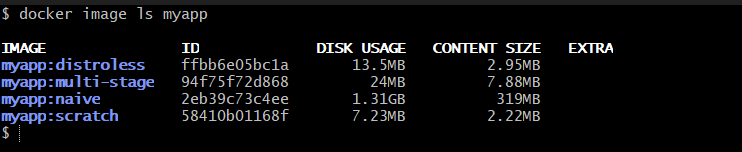
Each row is one Dockerfile change. The docker history <image> command shows which layers contribute the most bytes — useful for finding what’s left to trim:
docker history myapp:naive --no-trunc --format "table {{.Size}}\t{{.CreatedBy}}"
Verify CVE reduction with Trivy
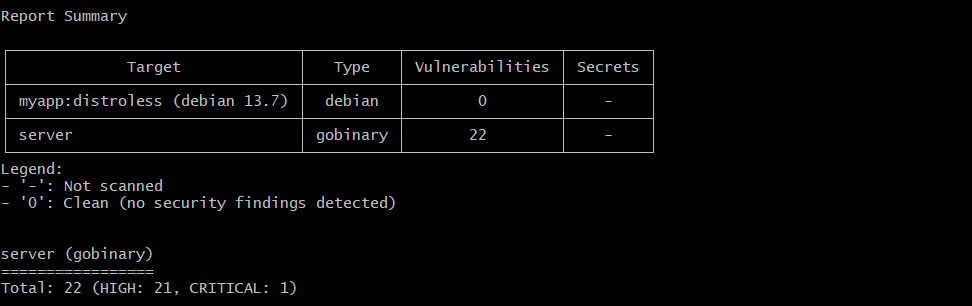
Before-and-after trivy image scan of the same app on debian:12 vs gcr.io/distroless/base-debian13 shows the security payoff visually — the color-coded HIGH/CRITICAL columns collapse to near-zero on distroless:
trivy image myapp:debian
trivy image myapp:distroless
Bottom line
Multi-stage builds plus the right final-stage base image cut Docker image size by 85-99% for most languages. Go and Rust drop to under 10 MB on scratch. Node and Python land in 50-200 MB on distroless. The changes are two-file edits (Dockerfile + .dockerignore) with no application code changes needed. Smaller images pull faster, cost less at scale, ship fewer CVEs, and cold-start faster in serverless. There is no reason a production Docker image should still be over 500 MB in 2026.
DevOps YAML Pack
40+ production-ready configs — Kubernetes, Docker, Terraform, Ansible, Helm, GitHub Actions. Every file commented. Copy, edit two lines, ship. MIT license, no watermarks.
Get the pack — ₹499 →