How to fix ImagePullBackOff in Kubernetes — 5 real causes
Every real reason ImagePullBackOff happens and the exact kubectl commands to diagnose + fix each one. No fluff.
ImagePullBackOff is the K8s error you’ll hit within your first week. Pods stay in ImagePullBackOff status. Nothing runs. Docs give generic advice.
Here are the 5 REAL causes ranked by frequency + the exact fix for each.
First, diagnose (30 seconds)
kubectl get pods
The status column immediately shows the problem:
Then:
kubectl describe pod <pod-name>
Scroll to Events: at bottom. The last event message tells you which of the 5 causes below you’re hitting:
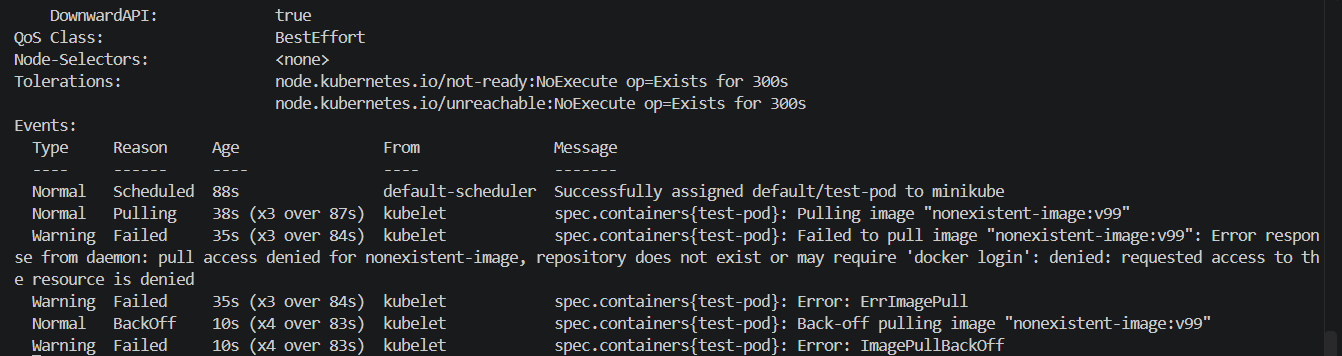
For a broader view of what’s happening across the cluster:
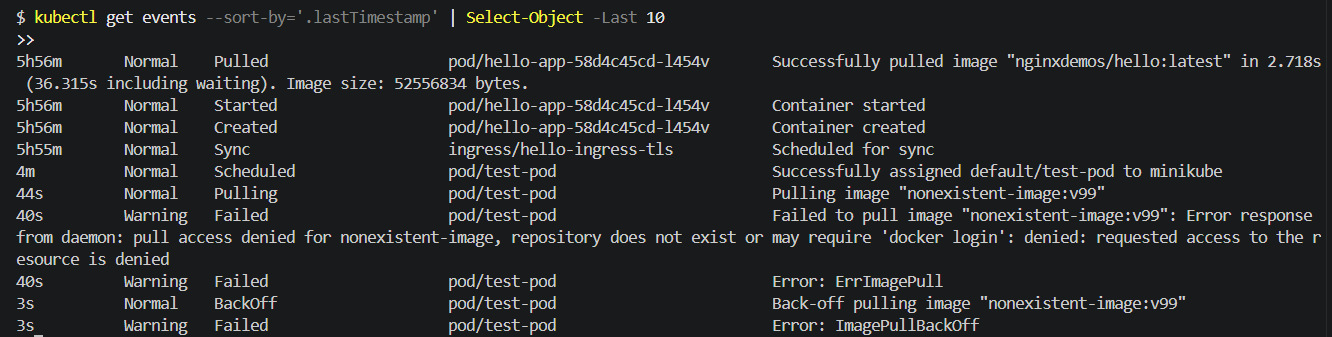
kubectl get events --sort-by='.lastTimestamp'
The events output shows the exact pull failure and its reason — often more useful than pod-level output alone:
Cause 1 (60% of cases) — typo in image name
Failed to pull image "nginc:latest": rpc error: ... pull access denied for nginc, repository does not exist or may require 'docker login'
You typed nginc not nginx. Or mysql:8.4.2 when the tag is 8.4. Or redis:latest-alpine (that tag doesn’t exist).
Fix: check the exact image name on Docker Hub:
docker pull <image-name>:<tag>
If Docker fails locally, K8s will fail too.
Cause 2 (20% of cases) — private registry, no credentials
Failed to pull image: unauthorized: authentication required
The image is on a private registry (Docker Hub private repo, ECR, GCR, or company registry). K8s doesn’t have credentials.
Fix: create a docker-registry secret + reference it in the pod spec:
kubectl create secret docker-registry regcred \
  --docker-server=<registry-url> \
  --docker-username=<user> \
  --docker-password=<pass> \
  --docker-email=<email>
Then in the Deployment:
spec:
  template:
    spec:
      imagePullSecrets:
      - name: regcred
      containers:
      - name: myapp
        image: private-registry.com/myapp:1.0
Cause 3 (10% of cases) — image exists but tag doesn’t
Failed to pull image "myapp:v2": rpc error: ... manifest unknown / manifest for myapp:v2 not found
Image myapp exists on the registry, but tag v2 was never pushed.
Fix: check what tags actually exist. On Docker Hub, browse to the image page → “Tags” tab. From CLI:
docker manifest inspect myapp:v2
If the manifest lookup fails, the tag doesn’t exist on the registry.
Cause 4 (5% of cases) — rate limits (Docker Hub)
Failed to pull image: toomanyrequests: You have reached your pull rate limit
Docker Hub limits anonymous pulls to 100/6 hours per IP. K8s cluster hitting that = pulls fail.
Fix: authenticate to Docker Hub even for public images (raises limit):
kubectl create secret docker-registry dockerhub-cred \
  --docker-server=https://index.docker.io/v1/ \
  --docker-username=<user> \
  --docker-password=<personal-access-token> \
  --docker-email=<email>
Reference it via imagePullSecrets in your pods.
Cause 5 (5% of cases) — network/DNS to registry blocked
Failed to pull image: net/http: TLS handshake timeout
K8s nodes can’t reach the registry (corporate firewall, air-gapped cluster, misconfigured DNS).
Fix: SSH into a node → try docker pull <image> manually. If it fails, check node’s DNS + firewall. Common corporate fixes:
- Add registry mirror config
- Use an internal registry
- Whitelist the registry hostname on firewall
Prevention
- Always pin image tags — never use
:latestin production (unpredictable + breaks caching) - Use image digests for prod:
myapp@sha256:abc123...(immutable, guaranteed same content) - Set up a private registry for internal images (Harbor / ECR / GCR)
- Enable image scanning (Trivy, Snyk) before deploying
The 30-second debug flow
Every ImagePullBackOff, run this:
kubectl describe pod <pod-name> | grep -A5 Events
kubectl get events --sort-by='.lastTimestamp' | tail -20
Read the error message. Match to the 5 causes above. Apply matching fix.
Rarely-mentioned gotcha
Image name is CASE SENSITIVE. MyApp:1.0 and myapp:1.0 are treated as different images. Always use lowercase for consistency.
What NOT to do
- Don’t restart pods hoping it “just works”
- Don’t recreate the deployment — same YAML = same error
- Don’t blame the cluster — 95% of these are your image name
The error is deterministic. Fix the input, output changes.
Kubernetes Debugging Handbook
Every Kubernetes error you'll hit — Pending, ImagePullBackOff, CrashLoopBackOff, OOMKilled, and 50+ more. Cause, diagnosis, fix, prevention. ~95 pages, indexed for outage-time lookup.
Get the handbook — ₹499 →