Fix: LLM API 429 rate limits — retry strategies that actually work
OpenAI, Claude, and other LLM APIs return 429 under load. Here are the retry patterns that work in production and the ones that make it worse.
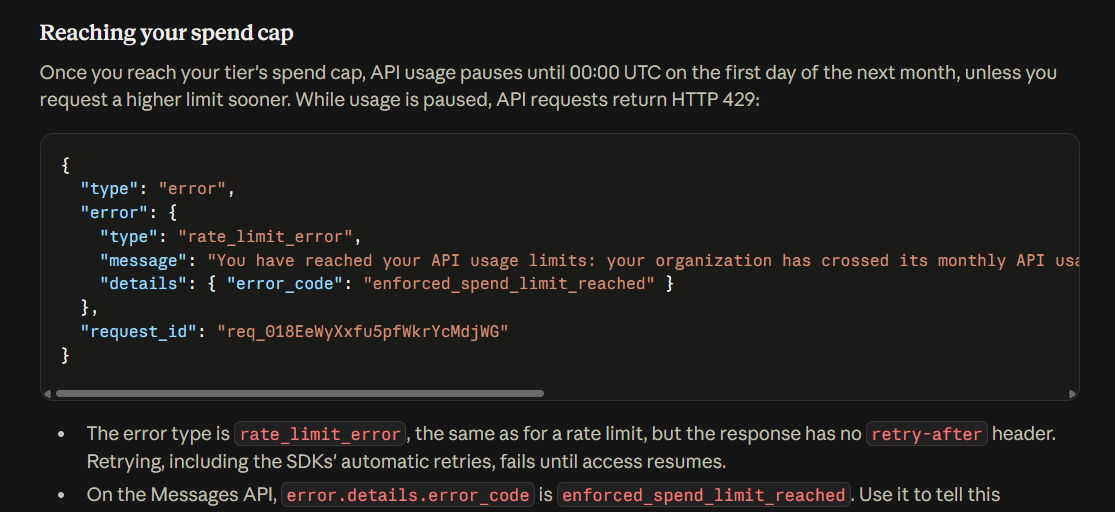
Your app calls Claude or OpenAI at scale. Everything works fine until traffic spikes and you get:
429 Too Many Requests
Or:
{"error": {"type": "rate_limit_error", "message": "..."}}
The naive fix (retry immediately) makes it worse — you multiply the load on an already-overloaded endpoint. Here’s what actually works in production.
Understand what triggered the 429
LLM APIs enforce three separate limits, and 429 responses don’t tell you which one you hit unless you inspect headers.
Read the response headers before retrying:
response = client.messages.create(...)   # or catch the exception
# Anthropic
print(response.headers.get('anthropic-ratelimit-requests-remaining'))
print(response.headers.get('anthropic-ratelimit-tokens-remaining'))
print(response.headers.get('retry-after'))
# OpenAI
print(response.headers.get('x-ratelimit-remaining-requests'))
print(response.headers.get('x-ratelimit-remaining-tokens'))
The three limits:
- Requests per minute (RPM) — too many calls, regardless of size
- Tokens per minute (TPM) — too much data per unit time
- Concurrent requests — parallel calls exceed the ceiling
Different limits need different fixes.
Diagnose first
Log every 429 with:
- Which limit was hit (from headers)
retry-aftervalue (in seconds)- Time of day and request pattern
Aggregate over a week. Patterns will show whether you need better retry, better batching, or a tier upgrade.
Cause 1 — Retry-after ignored, retry storms
Naive code:
for attempt in range(5):
    try:
        return client.messages.create(...)
    except RateLimitError:
        continue                # ❌ immediate retry hammers the API
Every retry adds load to the already-overloaded endpoint. All your workers hit at the same instant. Cascading failure.
Fix — respect the retry-after header:
import time, random

def call_with_retry(client, **kwargs):
    for attempt in range(5):
        try:
            return client.messages.create(**kwargs)
        except RateLimitError as e:
            retry_after = int(e.response.headers.get('retry-after', 0))
            if retry_after == 0:
                # Exponential backoff with jitter
                retry_after = (2 ** attempt) + random.uniform(0, 1)
            time.sleep(retry_after)
    raise Exception("Exceeded retry attempts")
Two rules:
- Honor
retry-afterif the header says so - Add jitter — without it, all your workers retry simultaneously after the same sleep
Cause 2 — Retry burst overwhelms recovery
Even with retry-after, if 1000 requests all fail simultaneously and all retry after 60 seconds, you get another spike at t+60s and another 429 storm.
Fix — jitter the initial delay too:
retry_after = int(e.response.headers.get('retry-after', 60))
retry_after += random.uniform(0, retry_after)  # 0-100% jitter
time.sleep(retry_after)
Now retries spread across a window instead of clustering.
Cause 3 — Token budget miscalculated (silent TPM overshoot)
You count requests but not tokens. A single long prompt hits TPM limit while you’re still under RPM.
Fix — pre-count tokens and gate:
Model ID note:
claude-sonnet-5shown below is the family alias — it resolves to the latest Sonnet 5 snapshot. For production, pin to a specific snapshot ID fromconsole.anthropic.com(e.g.claude-sonnet-5-20251001) so behavior doesn’t shift when Anthropic ships a new snapshot.
from anthropic import Anthropic

client = Anthropic()

def estimate_tokens(messages):
    return client.messages.count_tokens(
        model="claude-sonnet-5",
        messages=messages,
    ).input_tokens

# Before calling, check budget
tokens_needed = estimate_tokens(messages) + max_output_tokens
if not token_bucket.consume(tokens_needed):
    time.sleep(1)
    return call_with_retry(...)
A local token bucket (e.g., using a semaphore or ratelimit library) prevents you from ever hitting the API’s TPM ceiling.
Cause 4 — Not batching requests
You send 100 tiny requests where 1 batch would do. RPM limit hit; TPM would be fine.
Fix — batch or use asyncio for concurrency limits:
import asyncio
import anthropic

client = anthropic.AsyncAnthropic()

semaphore = asyncio.Semaphore(10)   # cap concurrent requests

async def call_with_limit(messages):
    async with semaphore:
        return await client.messages.create(
            model="claude-sonnet-5",
            max_tokens=1024,
            messages=messages,
        )

# Process 1000 items with max 10 concurrent
results = await asyncio.gather(*[call_with_limit(m) for m in messages_batch])
Semaphore caps concurrent in-flight requests — you never overshoot even under load.
Cause 5 — Missing prompt caching (paying for tokens you re-send)
If you send the same system prompt to every request, you’re using TPM budget for tokens that could be cached.
Fix — enable prompt caching:
Anthropic:
response = client.messages.create(
    model="claude-sonnet-5",
    system=[
        {
            "type": "text",
            "text": long_system_prompt,
            "cache_control": {"type": "ephemeral"},
        }
    ],
    messages=[...],
)
Cached prompts count for ~10% of normal token usage. If your system prompt is 5000 tokens and you make 1000 calls, that’s 4.5M tokens saved per hour.
Same principle in OpenAI (automatic caching for prompts >1024 tokens; no config needed).
Cause 6 — On free tier when you need production tier
Free/starter tiers have very low RPM/TPM. Any real load will trip them.
Fix — upgrade the account tier:
Anthropic tiers auto-upgrade based on cumulative spend history — spending crosses defined thresholds and the account moves up to the next rate-limit band. For enterprise-scale limits, contact sales directly.
OpenAI tiers unlock automatically as your account matures and spends. Verify billing is set up; unverified accounts stay on lower tiers.
Some limits require explicit request (e.g., higher context window, higher concurrency). Fill out the form; approval usually takes 1-2 business days.
The universal 429 debug flow
Every rate limit incident, in order:
# 1. Inspect the actual headers on 429s (which limit hit?)
# 2. Verify retry code honors retry-after (not blind sleep)
# 3. Add jitter (0-100%) on top of retry-after
# 4. Add concurrency semaphore (cap parallel in-flight)
# 5. Pre-count tokens locally, throttle before API call
# 6. Enable prompt caching if system prompt > 1000 tokens
# 7. Check account tier — request higher limits if needed
Steps 1-4 alone eliminate most retry storms.
Prevention
For any production LLM integration:
- Wrap every API call in a retry helper — one code path, not scattered try/except
- Log 429s with headers to a metrics system — Datadog/Grafana dashboards show tier utilization
- Track token spend per hour — alarm at 80% of TPM ceiling
- Concurrency semaphore even in dev — catches accidental parallel-heavy code before prod
- Prompt caching enabled — 10x token savings for common patterns
- Circuit breaker — after 10 consecutive 429s, stop calling for 5 min instead of hammering
- Fallback model — if primary tier is exhausted, degrade to a cheaper/lower-limit model (Haiku 4.5 instead of Sonnet 5, GPT-5.6-luna instead of GPT-5.6-sol) rather than fail
Bottom line
429s are a signal, not an error. The API is telling you “you’re going too fast — slow down.” Naive retry makes it worse; respecting retry-after, adding jitter, capping concurrency, and enabling prompt caching solves it. Instrument the response headers, plot rate limits over time, and upgrade tier before you’re in an outage — not during one.