Fix: Git rebase conflicts without losing work
Rebase conflicts intimidate developers into abandoning rebases. Here's how to resolve them safely, understand what git is asking, and never lose commits.
git rebase stops mid-flight with:
CONFLICT (content): Merge conflict in src/api/auth.ts
error: could not apply a2b3c4d... Add password reset flow
hint: Resolve all conflicts manually, mark them as resolved with
hint: "git add/rm <conflicted_files>", then run "git rebase --continue".
The rebase is paused. Some commits landed, some didn’t. Files show <<<<<<< markers. Any wrong move loses work. Here’s the safe path through.
Understand what happened
git rebase main tells git to replay each of your branch’s commits on top of main’s tip, one by one. When one of your commits changes the same lines a main commit already changed, git can’t apply your commit automatically — that’s the conflict.
At the moment of the error:
- Some of your commits are already replayed onto
main - The commit that conflicted is partially applied — files with conflict markers are in your working tree
- Remaining commits haven’t been tried yet
- Your original branch tip still exists in git’s reflog — no work is lost yet
The rebase is paused, waiting for you to resolve the conflict or abort.
First: create a safety net
Before touching anything, snapshot the branch. If the rebase goes wrong you can restore instantly.
# bash / zsh / Git Bash / WSL
git branch backup-before-rebase-$(date +%s)

# PowerShell equivalent (Windows-native)
git branch "backup-before-rebase-$([DateTimeOffset]::Now.ToUnixTimeSeconds())"
This creates a branch pointing at the current in-progress state. If you later realize a commit vanished, you can find it here.
Also verify your reflog has the pre-rebase state:
git reflog | head -10
The line labeled rebase (start) or rebase -i (start) is your undo point.
Diagnose — see exactly what conflicts
List conflicted files:
git status
Output will show:
Unmerged paths:
  (use "git add <file>..." to mark resolution)
        both modified:   src/api/auth.ts
        both modified:   src/api/session.ts
For each file, see the conflict:
git diff src/api/auth.ts
Conflict markers look like:
<<<<<<< HEAD
// This is what's on main (or previously-replayed commits)
if (token && !isExpired(token)) {
=======
// This is what your commit tried to change to
if (token && !isExpired(token) && !isRevoked(token)) {
>>>>>>> a2b3c4d... Add password reset flow
A real conflict looks like this in the terminal — the <<<<<<< HEAD, =======, and >>>>>>> markers are added directly into the affected file:
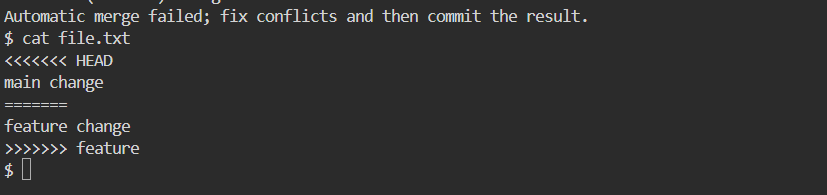
HEAD is the base you’re rebasing onto (plus any of your commits that already applied). The lower half is what your unapplied commit wanted to write.
Read both sides. The goal is a version that keeps both changes’ intent, not one that just picks a side.
Resolve the conflict
Three paths in decreasing preference.
Path A — merge intent by hand (default). Edit the file, delete the markers, write the correct combined version. In the example above:
if (token && !isExpired(token) && !isRevoked(token)) {
Both changes preserved. Then:
git add src/api/auth.ts
Path B — accept one side wholesale when the other side is truly redundant.
Keep main’s version:
git checkout --theirs src/api/auth.ts
git add src/api/auth.ts
Keep your version:
git checkout --ours src/api/auth.ts
git add src/api/auth.ts
Note: --theirs and --ours are counter-intuitive during rebase. --ours refers to the branch you’re rebasing ONTO (main), --theirs refers to your commits. This is opposite of git merge. Verify with git diff --staged before continuing.
Path C — use a merge tool for large conflicts:
git mergetool
Set once:
git config --global merge.tool vimdiff # or vscode, meld, kdiff3
VS Code users:
git config --global merge.tool vscode
git config --global mergetool.vscode.cmd 'code --wait $MERGED'
Continue the rebase
After resolving all conflicted files:
git status  # confirm nothing left unmerged
git rebase --continue
Git tries the next commit. If another conflict, repeat. When all commits replay cleanly:
Successfully rebased and updated refs/heads/feature-branch.
Abort if unsure
At any point during the rebase:
git rebase --abort
This restores your branch to exactly where it was before the rebase started. Zero work lost. Use this whenever you’re not sure what the correct resolution is — resolve later with a clearer head or ask a teammate.
Skip a commit that’s now redundant
Sometimes your commit made a change that main already made. The rebase paused for a conflict but there’s actually nothing to do.
git rebase --skip
This drops the current commit from the rebased history and moves to the next one. Only use when the commit is genuinely redundant — otherwise you lose work.
Verify with git log --oneline main..HEAD after the rebase to confirm your remaining commits are what you expected.
Recover from a bad rebase
You finished the rebase, pushed with --force, then realized commits are missing or a resolution was wrong.
Recover with reflog:
git reflog
Find the entry labeled rebase (start) or the last known-good state:
a1b2c3d HEAD@{5}: rebase (start): checkout main
9e8d7c6 HEAD@{6}: commit: Add password reset flow (before rebase)
Reset to that commit:
git reset --hard HEAD@{6}
Force-push to restore the remote:
git push --force-with-lease origin feature-branch
--force-with-lease is safer than --force — it refuses if someone else pushed since you last fetched.
If reflog is gone (e.g., cloned fresh): the backup-before-rebase-* branch from step 1 has your commits.
Common cause 1 — Same file edited on both sides
Your PR and someone else’s PR both touched auth logic. This is inevitable in team development.
Resolution pattern: merge both intents manually. Read the surrounding code to understand what each change was doing, then combine.
Prevention: rebase early and often. Pull main into your branch daily rather than waiting until the PR is ready — smaller conflicts, less painful merges.
Common cause 2 — Formatter changed everything
A teammate ran Prettier or ESLint —fix, reformatting hundreds of files. Now your commit conflicts with cosmetic changes everywhere.
Resolution:
# Take main's formatting, then reapply your logical change
git checkout --theirs .
git add .
git rebase --continue

# Now re-run the formatter on your original change if it wasn't reformatted
npx prettier --write src/
Prevention: land formatter commits on their own PRs and merge them before starting feature work. Configure .git-blame-ignore-revs to exclude the formatting commit from blame.
Common cause 3 — Package.json / lockfile conflicts
Adding dependencies conflicts often. Both branches added packages, versions differ.
Fix:
# Take main's package.json + lockfile
git checkout --theirs package.json package-lock.json
# Then re-add your dependency on top
npm install your-package
git add package.json package-lock.json
git rebase --continue
Never hand-edit lockfiles. Always let npm install regenerate them.
Common cause 4 — Binary file conflicts
Images, PDFs, .db files can’t be text-merged.
git checkout --theirs assets/logo.png  # or --ours
git add assets/logo.png
Pick the version you want; there’s no combining binaries.
The safe-rebase checklist
Before starting any rebase:
git statusshows clean working tree (no uncommitted changes)git branch backup-before-rebase-$(date +%s)snapshots the branchgit fetch origingets latest maingit rebase origin/mainstarts the rebase
If it goes wrong:
git rebase --abort→ back to start, zero riskgit reflogshows every recent HEAD position- The
backup-before-rebase-*branch is always there
Prevention — smaller rebases hurt less
Long-lived branches cause big rebases. Habits that keep rebases small:
- Rebase daily, not at PR time.
git fetch && git rebase origin/mainevery morning. - Keep PRs small. A 50-line PR rarely conflicts. A 2000-line PR often does.
- Merge formatter commits separately so they don’t tangle with feature work.
- Coordinate on shared files. If two people plan to touch
auth.ts, sequence the work.
Bottom line
Rebase conflicts feel destructive but git makes them safe as long as you know the escape hatches. git rebase --abort is always available. git reflog remembers reachable commits for 90 days by default (gc.reflogExpire) and unreachable ones for 30 days (gc.reflogExpireUnreachable). So your rebase-abandoned commits are recoverable for up to 90 days. Snapshot the branch before starting, understand the <<<<<<< HEAD vs incoming markers, and resolve by merging intent rather than picking a side. Nothing is lost as long as you don’t hard-reset or force-push before verifying the result.